Turn every commute into a shared ride
Give employees a built-in way to share rides to the office — with route matching, in-app requests, and real-time trip coordination. Fewer cars on the road, lower commuting costs, and a stronger sense of team.
Free consultation • No commitment • Live in days, not months
Trusted by multinationals and leading enterprises worldwide










One employee, one car, one empty parking spot after another
Most employees drive to the office alone — even when colleagues live minutes away. The result: overcrowded parking lots, higher commuting costs, more traffic congestion around your building, and a growing carbon footprint your sustainability team can't ignore.
Generic ride-sharing apps don't solve this. They're designed for strangers, not coworkers. There's no connection to your office, no way to match routes with colleagues, and no visibility for the company into commuting patterns.
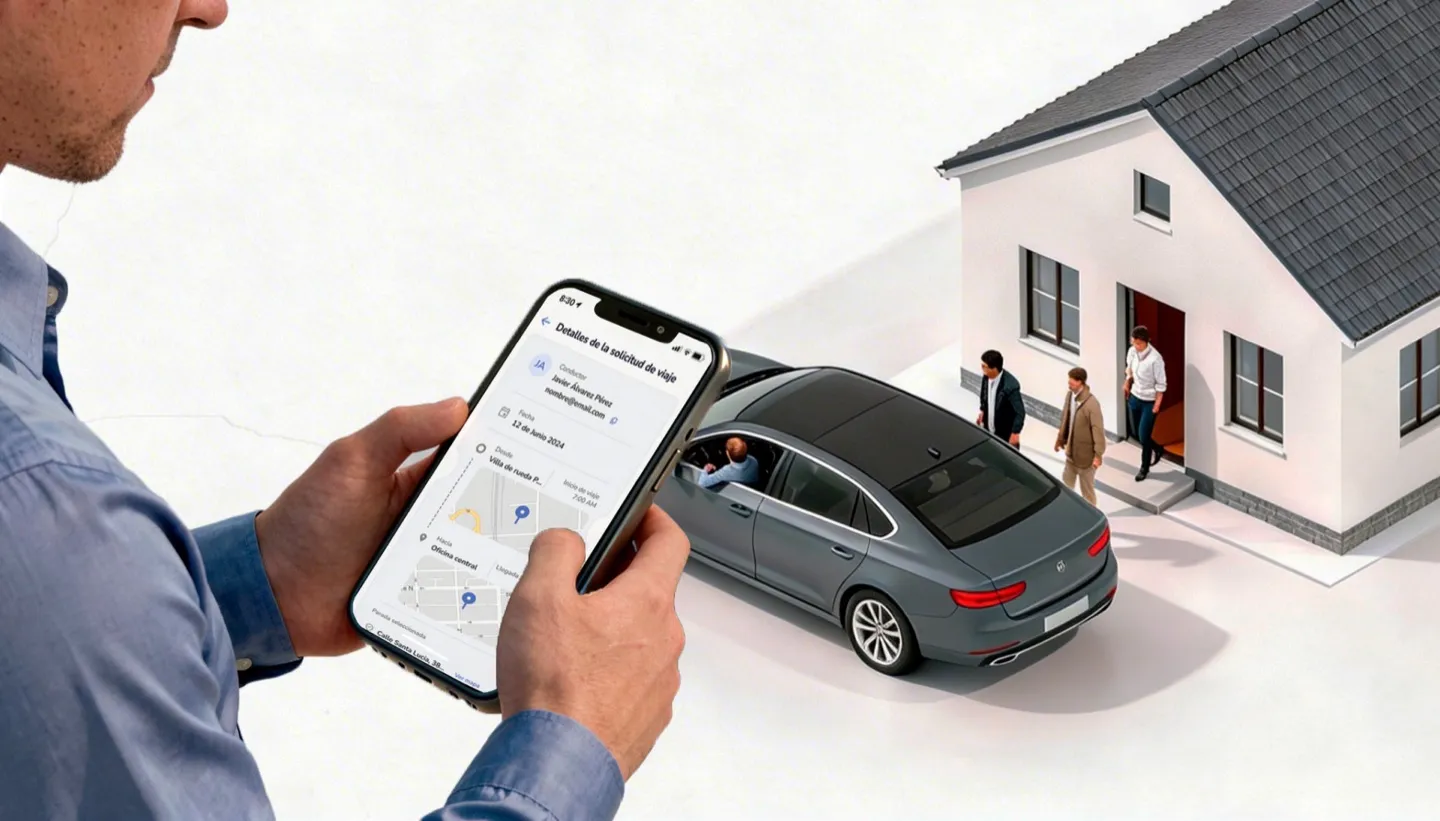
Parso Carpooling is built into the same workplace app employees already use every day. Drivers publish their route, passengers request a seat, and the app handles matching, approvals, chat, and trip tracking — all within your trusted corporate environment.
Drivers offer rides. Passengers hop on. Everyone wins.
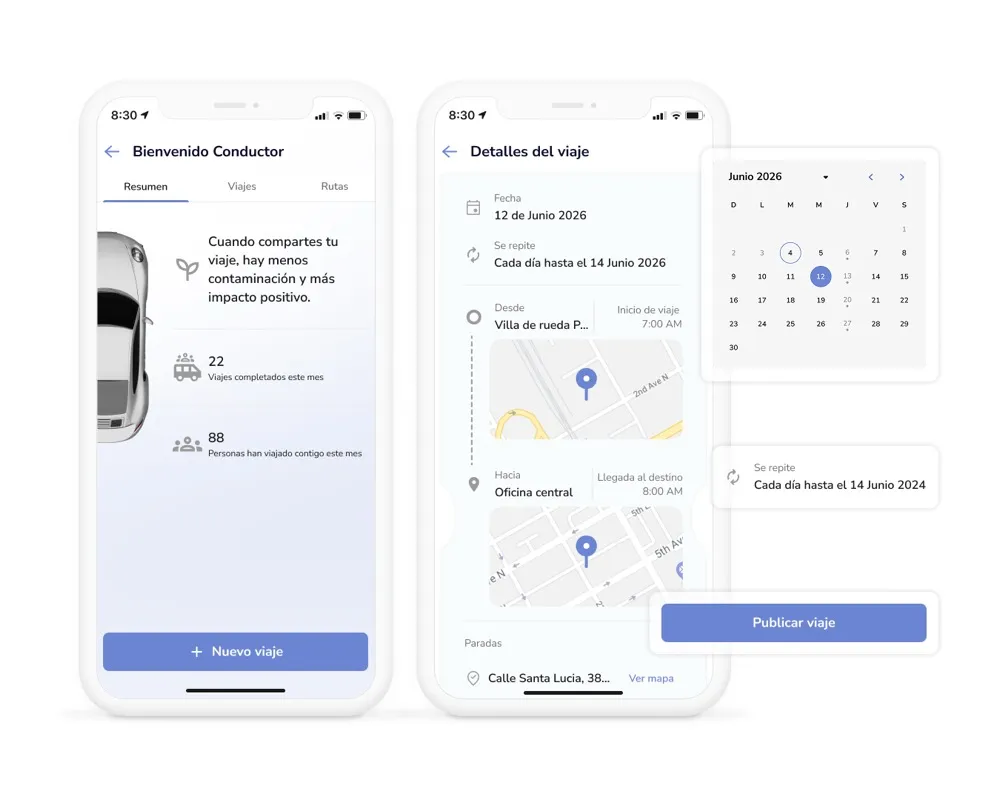
Publish your ride in under a minute
Drivers select a date, set a departure time, choose their vehicle and number of available seats, and define their route — either by creating a new one on the map or picking a saved route. Set it once and enable daily or weekly recurrence so you don't have to recreate it every morning.
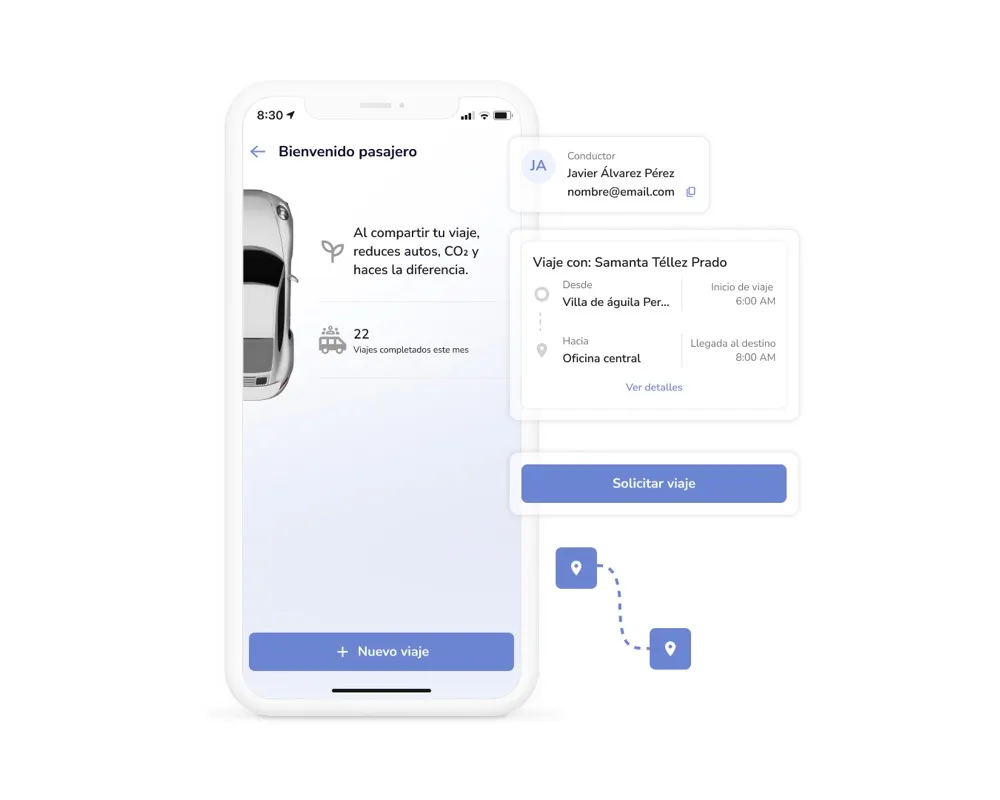
Find a ride that matches your commute
Passengers pick a date, set their desired arrival time, and drop a pin on the map for their pickup location. Parso shows all available rides that match — with the driver's name, route, departure time, and seat availability. Tap to see full trip details, then request a seat.
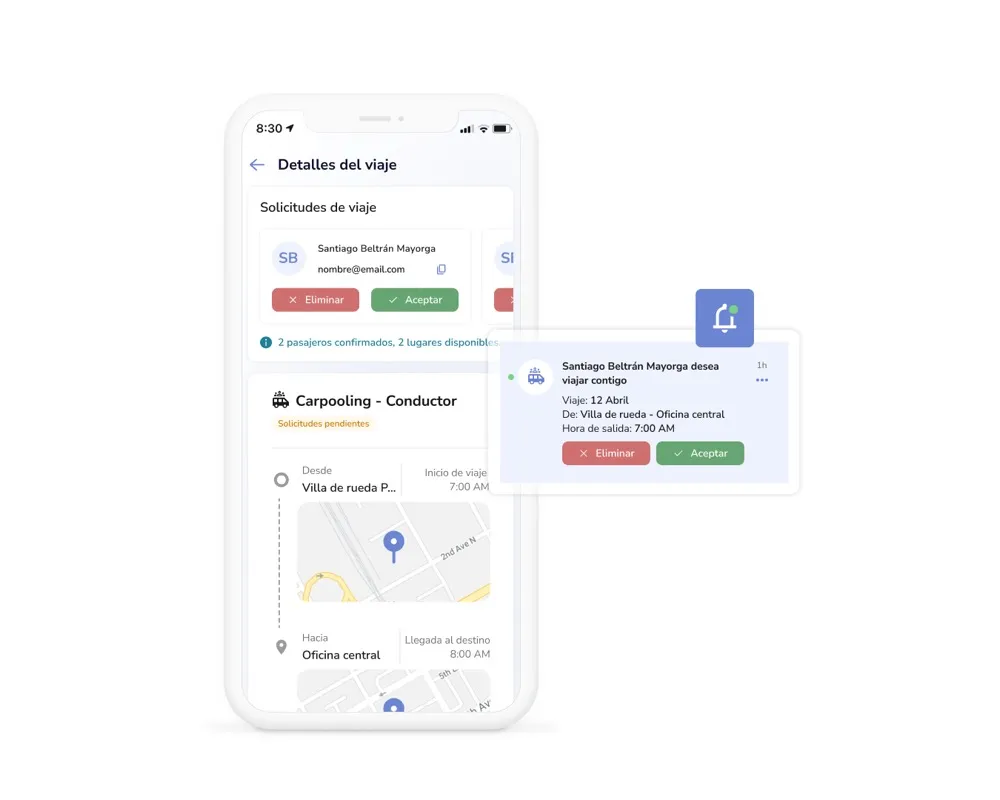
Every seat is approved by the driver
When a passenger requests a ride, the driver gets a notification and can accept or decline right from the app. Drivers stay in full control of who joins their trip — no surprise passengers, no overbooked seats. Accepted passengers get a confirmation instantly.
A group chat for every trip
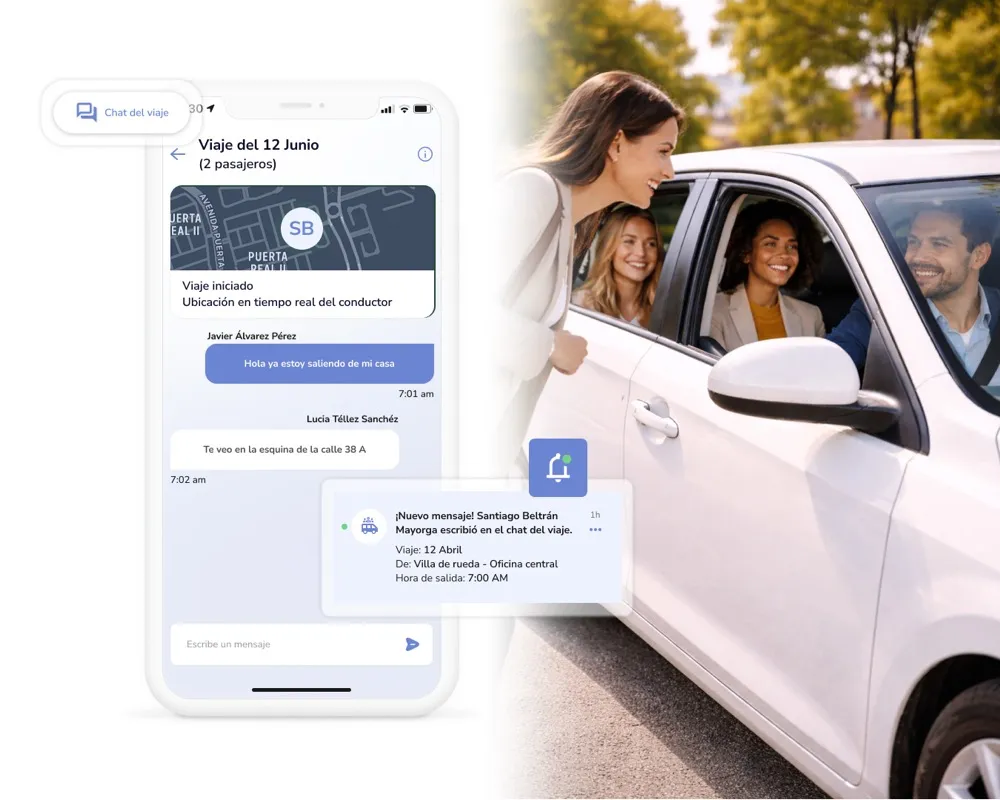
Once a request is accepted, a group chat opens between the driver and all confirmed passengers. Coordinate pickup details, share running-late updates, or adjust plans on the fly — all within the app. No need to exchange personal phone numbers.
Save your route once, reuse it every day
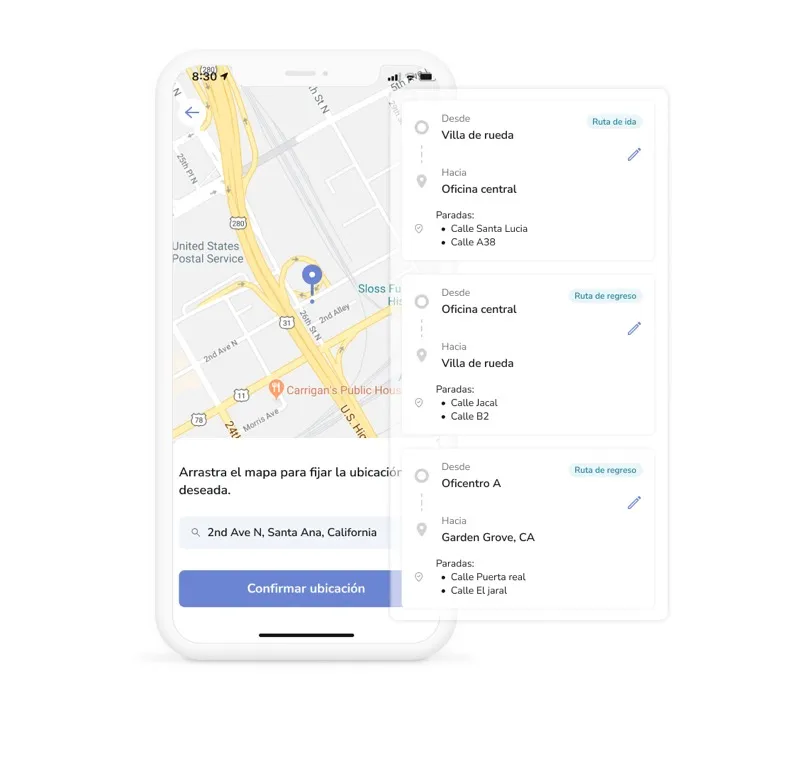
Drivers build their commute route directly in the app — using an interactive map or the location search bar. Save it, name it, and reuse it for every future trip. Create separate routes for your morning commute and your drive home, and edit them whenever your routine changes.
- Map-based route builder — Tap on the map or type an address to set your departure point and destination. The app plots your route instantly.
- Saved routes library — All your routes are stored and ready to select when you create a new trip. No re-entering addresses every morning.
- Outbound & return routes — Create separate routes for your commute to the office and your drive home, each with its own schedule and availability.
- Edit anytime — Moved to a new neighborhood? Changed offices? Update your routes in a few taps without losing your trip history.
- Geolocation-powered — The app uses your device's location services to suggest nearby starting points and show your position on the map in real time.
Corporate carpooling with everything drivers and passengers need — in one app
Daily & weekly recurrence
Drivers set a trip once and repeat it daily or weekly. The schedule, route, and seat count carry over — no need to publish a new ride every day.
Vehicle management
Drivers register their vehicles in the app with details like make, model, and seat capacity. Select a saved vehicle when creating a trip, or add a new one on the fly.
Flexible cancellation
Both drivers and passengers can cancel trips before departure. If a driver cancels a trip with accepted passengers, everyone is notified automatically.
Seat availability control
Drivers define how many passenger seats are available per trip. The app enforces the limit — no overbooking, no awkward conversations.
Request & approval flow
Passengers request a seat, drivers approve or decline. Every ride is a conscious choice — not an automatic match with a stranger.
In-app group chat
A private group chat opens for each confirmed trip. Coordinate pickup logistics, share updates, and communicate without exchanging personal contact info.
Trip activity dashboard
Drivers and passengers see how many trips they've completed and how many passengers have traveled this month — right on their home screen.
Real-time notifications
Push notifications for new ride requests, approvals, cancellations, trip start, trip end, chat messages, and passenger check-in reminders. Nobody misses an update.
Map & search-based locations
Every location — pickup points, destinations, route stops — is selected via an interactive map or a text search bar. Precise, fast, and no manual address entry.
Measure your carpooling program's real impact
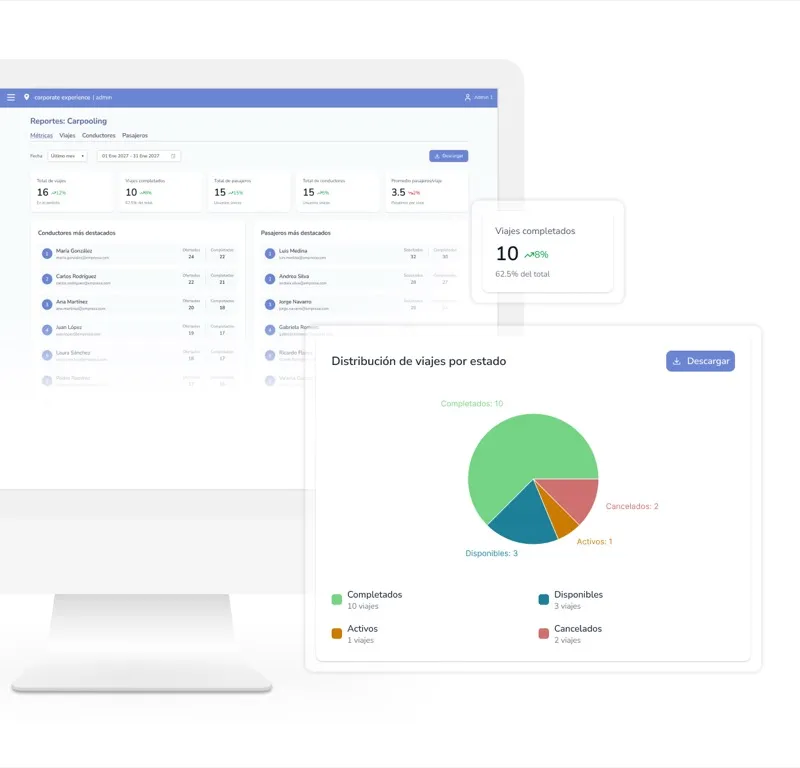
Carpooling isn't just a nice-to-have — it's a measurable initiative that reduces parking pressure, lowers emissions, and saves employees money. Parso gives facilities and sustainability teams the data to prove it.
- Trips completed per period — Track how many shared rides happen each week or month across your organization.
- Passengers per driver — See average ridership per trip to understand adoption and seat utilization.
- Most active routes — Identify the most popular commute corridors so you can encourage carpooling where demand is highest.
- Participation trends — Monitor how adoption grows over time — by team, building, or location.
- Sustainability metrics — Estimate the number of single-occupancy trips avoided and the CO₂ savings your carpooling program delivers.
No extra app. No extra login.
Parso Carpooling lives inside the same app your employees already use for desk booking, parking, room reservations, and more. One login, one interface — carpooling is just another feature, not another tool to adopt.
 Microsoft Outlook
 Google Calendar
 Microsoft 365
 Microsoft Teams
 Zoom
 Slack
 Okta
 Azure AD
Corporate carpooling FAQ
Carpooling fits into a bigger picture
Parso connects every part of the workplace experience — from the ride in, to the desk, to the meeting room, and back home.
Fewer cars. Fuller seats. A better commute for everyone.
See how Parso helps companies launch employee carpooling programs that actually get adopted — with built-in route matching, trip coordination, and real-time communication.
Free consultation • No commitment • Live in days, not months