AI that triages, assigns, and tracks every workplace request
Employees describe the issue in plain language. AI categorizes it, sets the priority, assigns the right technician, tracks the SLA, and follows up — automatically. No forms, no manual routing, no tickets lost in a WhatsApp thread.
Free consultation • No commitment • Live in days, not months
Trusted by multinationals and leading enterprises worldwide








Five channels in. Zero intelligence out.
Maintenance requests arrive through WhatsApp. A broken projector gets reported over email. The kitchen sink leak goes to a Teams message that nobody sees until Monday. When service requests scatter across five channels, no system is learning from them — and nothing gets better.
For facilities teams, it means no SLA data, no pattern detection, no way to prove impact. For employees, it means shouting into the void — no idea where to report, how long a fix will take, or whether anyone is even working on it.
Parso replaces all of that with an AI layer that sits across every channel. Employees describe the issue in natural language — from the app, Teams, or Slack — and AI reads the request, classifies it, sets the priority based on context, assigns the right team, and tracks resolution against your SLAs. The intelligence compounds: every ticket makes the system smarter at routing, detecting duplicates, and surfacing patterns your team would never catch manually.
AI handles the ticket. Your team handles the fix.
Talk to it like you'd text a colleague
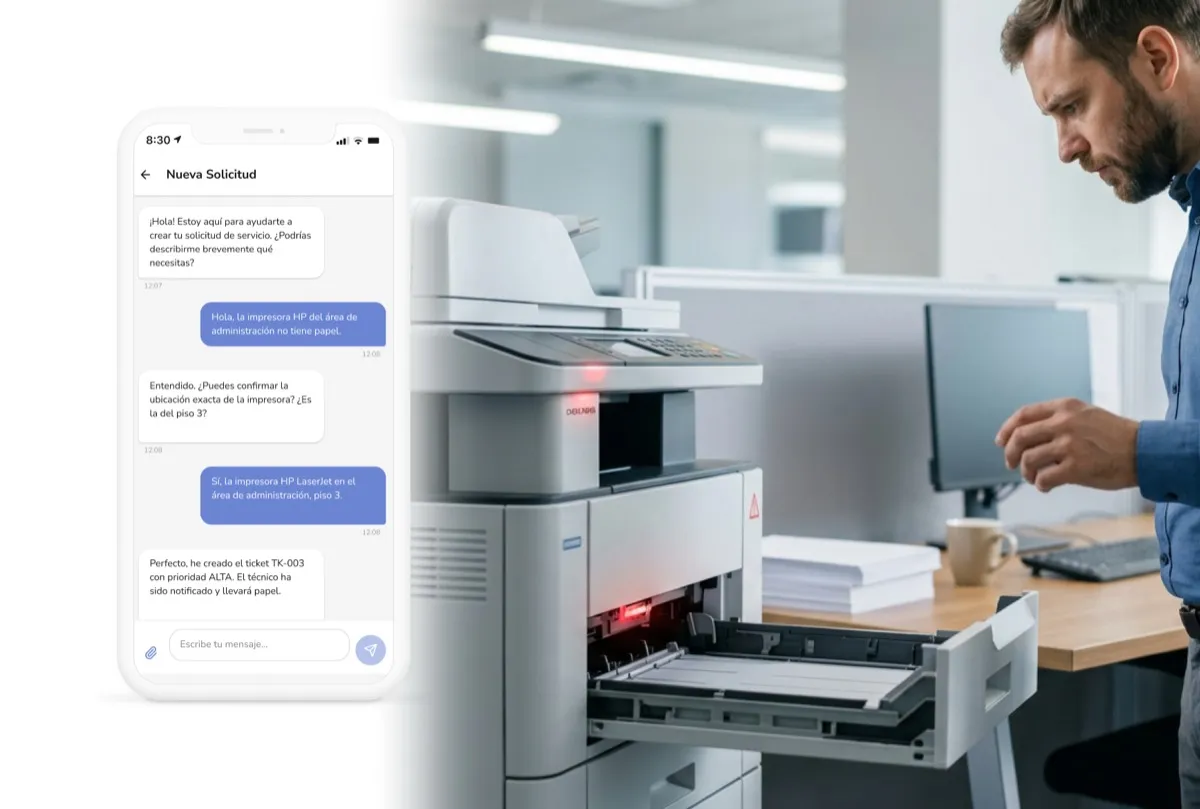
Employees open the app — or message the Teams or Slack bot — and describe the problem in their own words. Parso's AI understands the intent, asks smart follow-up questions, and requests a photo when visual evidence would help. No forms, no category dropdowns, no "please select a subcategory." The AI creates a fully structured ticket from a natural conversation.
AI reads the request — and knows exactly where to send it
The moment a ticket is created, AI analyzes the description, the employee's location, their building and floor, and your team's routing rules. It assigns the right category, calculates priority based on urgency and business impact, and routes the ticket to the correct technician or team — in seconds, not hours. If someone else already reported the same issue, AI flags it as a duplicate before your team even sees it.
AI prioritizes the queue. Your team focuses on the fix.
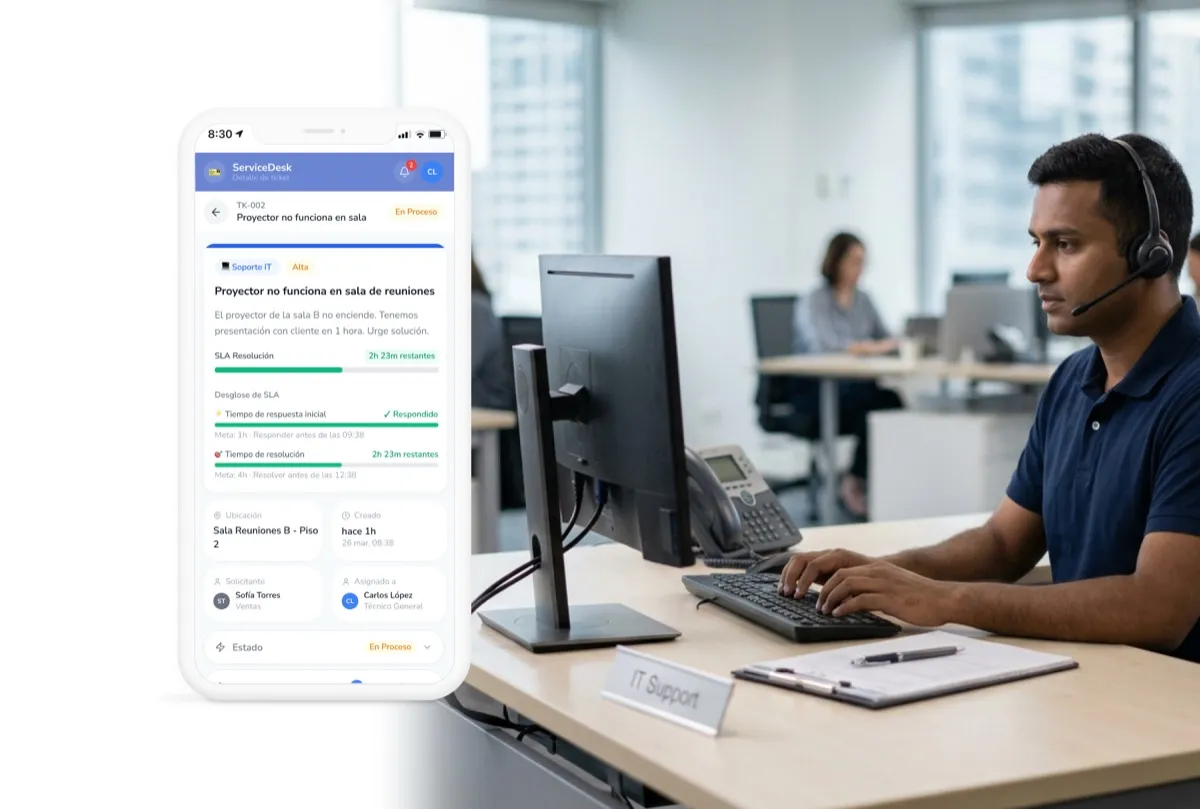
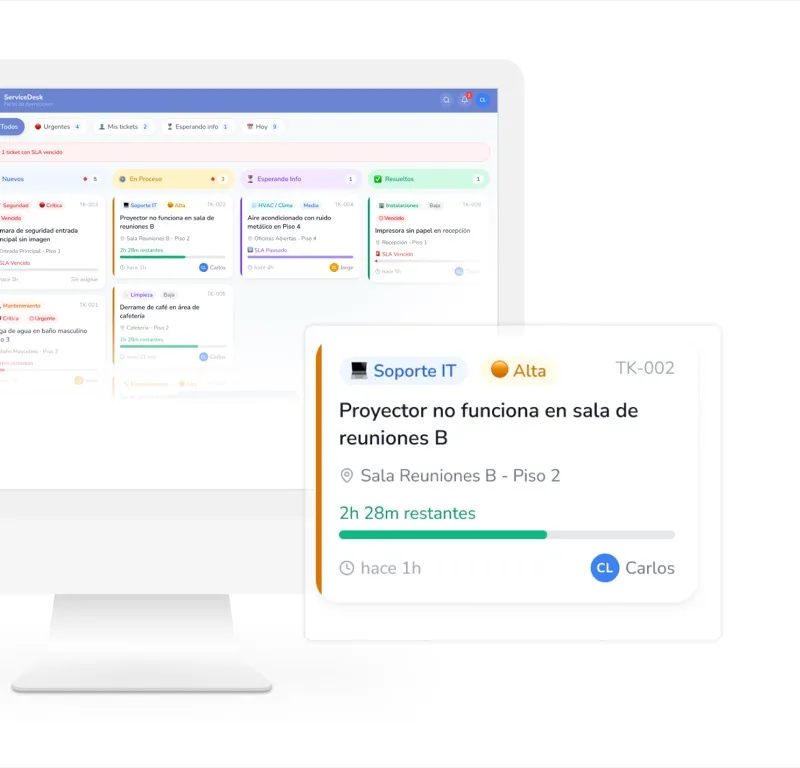
Facilities teams shouldn't spend time sorting tickets — AI does that. Parso's work queue is automatically ranked by SLA urgency, AI-calculated priority, and business impact. Your technicians see a mobile-first list that tells them exactly what to work on next, with swipe actions, quick replies, and voice notes. On desktop, the same queue becomes a full Kanban board. The AI keeps re-prioritizing in real time as new tickets come in and SLAs tick down.
- AI-ranked priority queue — Tickets are automatically ordered by SLA urgency, business impact, and recurrence patterns. The most critical issue is always at the top — no manual sorting.
- Desktop Kanban board — Drag tickets across columns — New, In Progress, Waiting, Resolved — with full visibility into your team's workload at a glance.
- Quick reply templates — Pre-configured responses like "On my way," "Need a photo," or "Resolved — please confirm" so technicians can update tickets in seconds.
- Voice notes with AI transcription — Tap, speak, done. AI transcribes the note and attaches it to the ticket as a searchable update — no typing required when you're wearing gloves or carrying tools.
- Auto-escalation before breach — If a ticket is approaching its SLA limit and the assigned technician hasn't acted, AI escalates it to their supervisor and sends an alert — before it breaches, not after.
An AI facilities help desk — from intake to insight
Natural language understanding
Employees describe the problem in their own words — in any supported language. AI parses the intent, extracts structured data, and creates a fully categorized ticket without a single dropdown.
AI-prompted photo evidence
When the AI detects that an issue would benefit from visual context — damage, stains, broken equipment — it proactively asks the employee to attach a photo. Smarter intake from the first message.
AI-powered SLA tracking
Define response and resolution SLAs by category, priority, and location. AI monitors every ticket against its SLA in real time and triggers escalation before a breach happens — not after.
AI duplicate detection
When multiple employees report the same leaking pipe or broken projector, AI cross-references location, category, and timing to flag duplicates automatically — preventing redundant work.
AI-assisted categorization
You define the categories — maintenance, cleaning, security, catering, AV, furniture. AI learns your structure and maps every incoming request to the right category and subcategory with no manual input.
On-behalf-of reporting
Receptionists, managers, or facilities staff can create tickets on behalf of someone else — including external visitors. Both the reporter and the affected person are tracked and notified.
Predictive escalation
AI doesn't wait for an SLA to breach. It monitors technician activity, compares it against resolution patterns, and escalates to supervisors when it predicts a ticket won't be resolved in time.
Automated CSAT & closure
AI manages the close-out flow: it asks the requester to confirm resolution, sends a satisfaction survey, and auto-closes the ticket if there's no response — with full audit trail.
Intelligent notification digest
AI consolidates routine updates into a single digest and sends critical alerts immediately — preventing notification fatigue while ensuring nothing urgent is missed. Frequency is configurable per user.
AI finds the patterns. You make the decisions.
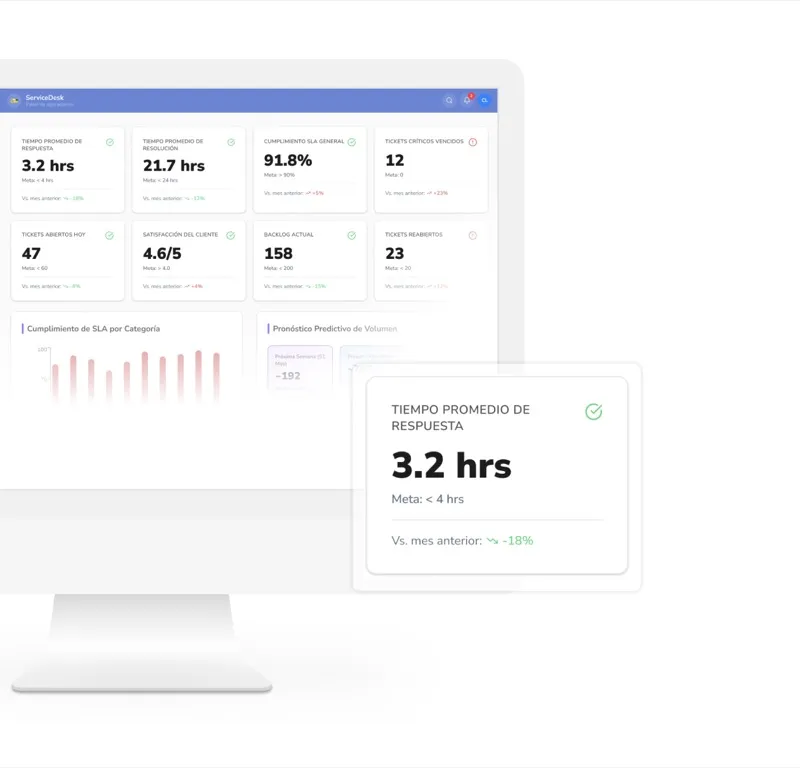
Dashboards show you what happened. AI tells you what to do about it. Parso doesn't just track SLA compliance — it surfaces recurring problems, identifies bottleneck teams, flags root causes, and recommends specific actions. Your facilities leadership gets the data to optimize staffing, justify budgets, and report to the C-suite with confidence.
- SLA compliance dashboard — Track response and resolution times against your targets. See breach rates by category, site, team, and priority level — all in real time.
- AI-generated insights — Parso automatically detects patterns: a projector that fails every two weeks, a floor that generates 3x more tickets, a team that's consistently overloaded. Each insight comes with a recommended action.
- Root-cause analysis — AI cross-references ticket history, location data, and asset information to surface probable root causes — so your team can fix the system, not just the symptom.
- Predictive volume forecasting — Based on historical patterns, AI estimates ticket volume by category and time window — so you can staff accordingly and prevent SLA breaches before they start.
- Exportable reports — Download ticket data, SLA compliance, and AI-generated recommendations for executive presentations, vendor negotiations, or compliance documentation.
Report issues from any channel. Manage them from one place.
Parso Service Request meets employees where they are — whether that's the mobile app, a Slack channel, or a Teams message. Every ticket, regardless of origin, flows into the same intelligent queue.
 Microsoft Outlook
 Google Calendar
 Microsoft 365
 Microsoft Teams
 Zoom
 Slack
 Okta
 Azure AD
Facilities service requests FAQ
Service requests are just one part of the platform
Parso connects your entire workplace — and many of the tickets your team handles are already linked to the spaces and services employees book every day.
Let AI run your service operations. Your team runs the fixes.
See how Parso's AI triages every request, assigns the right person, tracks SLAs in real time, detects recurring issues, and gives your leadership team the intelligence to make better decisions — all from one platform.
Free consultation • No commitment • Live in days, not months